
How to keep an AI character consistent across videos
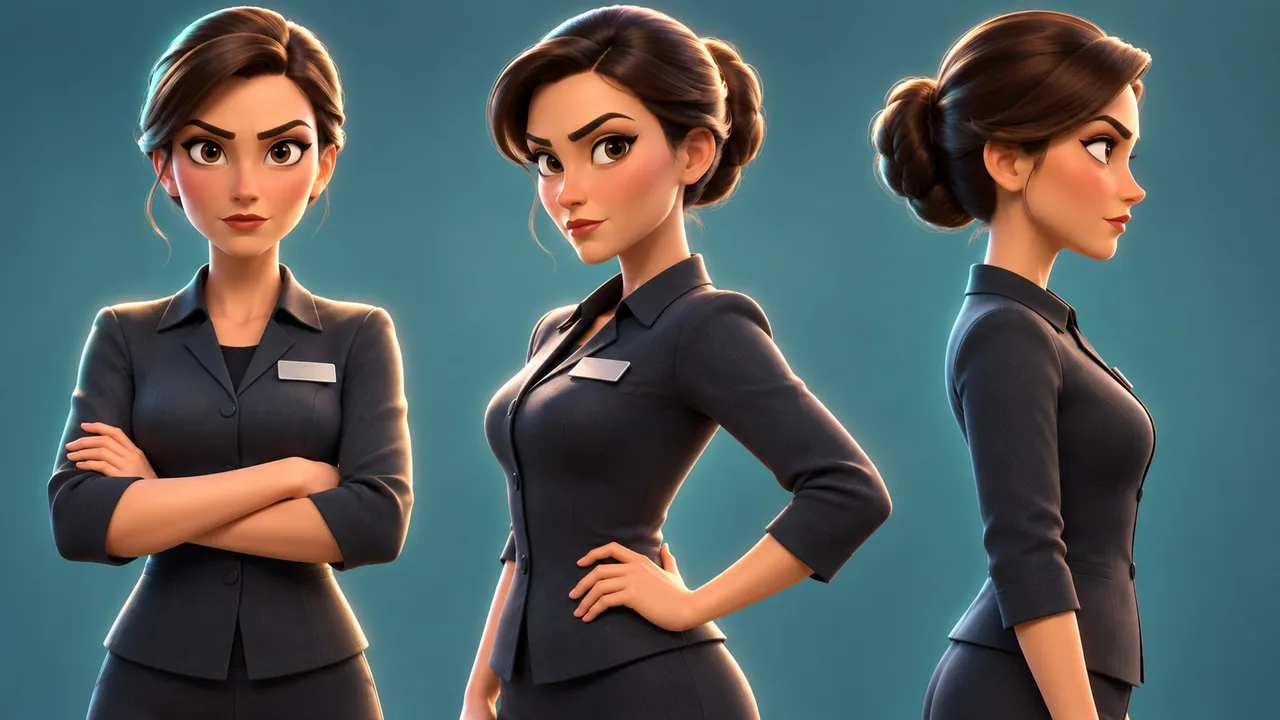
Lock a character reference sheet — multiple angles, one approved face — before you animate anything; a text description alone gets reinterpreted fresh every time and drifts from clip to clip.
Why does my AI character's face change between shots?
It's the single most common question in our DMs — we've counted 14 versions of it. The short answer: if the only thing telling the model what your character looks like is a sentence of text, you don't have a character. You have a description, and a description gets reinterpreted from scratch every time it's generated.
Say your prompt is 'a red panda barista with round glasses and a green apron.' That sentence doesn't pin down the exact shape of the ears, the exact shade of green, or how wide-set the eyes are. The model fills in those gaps itself, and it fills them in slightly differently each pass — a new seed, a new background, even a re-run of the same words can land on a different face. Across a 15-second film cut from several shots, that drift is usually invisible until you watch the cut and three shots show three different pandas.
What's a locked character reference sheet, and why does it actually fix this?
A reference sheet is a small, fixed set of approved images of your character — not a paragraph, pixels. Front view, three-quarter view, profile, a couple of expressions, one full-body shot for proportions. We generate it once, you sign off on it, and from that point it doesn't change.
Every shot after that gets built by conditioning the generation on those images, not by re-describing the character in words. The model isn't guessing what 'round glasses' means anymore — it's matching a face it's been shown directly. That's the actual mechanism: you move the character from language, which is fuzzy, into pixels, which aren't.
- Front, 3/4 and profile views — enough angles that the model has seen more than one side of the face
- Two or three locked expressions, so 'happy' and 'surprised' don't get reinvented per shot
- One full-body reference for proportions, so limbs and head size stay consistent at any distance
How do you reuse one cast across a whole series?
Once a character's sheet is locked, it goes in the project folder and stays there. The next film with that character — new script, new scene, months later — starts from the same locked sheet instead of rebuilding the face from a description again. Across the 199 films we've published, most of the recurring casts are one to three characters that have carried a brand for months this way.
This is also the quiet reason recurring characters cost less over time — the expensive, fiddly part is getting the face locked and approved once, not per video. If you haven't read it yet, we've written more on that tradeoff directly.
What still breaks even with a locked reference sheet?
Be honest with yourself here, because we have to be honest with clients: a reference sheet narrows drift, it doesn't erase it. Angles the sheet never covered — a hard back-three-quarter, a low worm's-eye shot — are still a guess. Expressions outside the two or three you locked can slip. Hands doing fine work with props (pouring, typing, holding small objects) are still the weakest part of any current AI video pipeline, locked sheet or not.
Scenes with two or more characters close together are harder too — the model has to hold two locked identities at once instead of one, and that's where you're most likely to catch a stray drifted feature. If your script leans hard on close hand work or characters overlapping in frame, expect a manual touch-up pass, not a fully automatic fix. If a project genuinely needs that level of precision shot after shot, say so up front — we'd rather tell you where the seams are than let you find them after delivery.
How much does locking a character actually take?
It's a pass that happens before any animation starts, not an add-on afterward. We generate the candidate sheet, you look at it and flag anything off — ears too big, apron the wrong green, whatever — and we regenerate until it's approved. Once it's locked, it's locked; we don't reopen it mid-series unless you're deliberately changing the character's look.
That upfront pass is also why rushing straight to animation without it almost always costs more in the end — you end up paying for reshoots of shots that would've been fine if the face had been pinned down first.
Common questions
Can you fix a character that's already drifted after the video is generated?
Not cleanly. Patching a drifted frame after the fact is slow and rarely matches perfectly. It's much faster and cheaper to lock the reference sheet before generating anything than to repair drift afterward.
Does locking a reference sheet cost extra?
It's part of building the character, done once, then reused for every future film with that character — so it's not an added cost per video, it's the thing that makes later videos in a series cheaper.
How many reference images does a character actually need?
Usually five to seven: a front view, a three-quarter view, a profile, two or three locked expressions, and a full-body shot for proportions. Enough that the model has seen the character from more than one side.
What if I want to change my character's outfit partway through a series?
That's a new reference pass for the outfit while the face and proportions stay locked — treat wardrobe as its own lock, not a reason to rebuild the whole character from scratch.